
Content ITV PRO
This is Itvedant Content department
TravelTest Page Object Model (POM) Implementation
Business Scenario
Welcome to the QA Automation Team at TravelTest Pvt. Ltd.
The QA Manager has assigned you the task of improving the Selenium Automation Framework of the TravelTest Web Application using the Page Object Model (POM) Design Pattern.
As part of this lab, you will design the POM Structure by creating separate Page Classes for differentmodules of the application.You will organize Web Element Locators and Reusable Methods in dedicated
Pre-Lab Preparation
classes to improve Code Readability, Reusability, and Maintainability. You will also automate user actions such as Login, Search, and Navigation using the POM Approach to create a Scalable and Efficient Automation Framework for the TravelTest Application.
Introduction to Page Object Model (POM)
Importance of Framework Design in Selenium
Benefits of POM in Automation Testing
Structure of POM Framework
git pull origin branchNameGit Pull
Task 1: Design POM structure
Open Eclipse/IntelliJ IDE
1
Launch the IDE and open the Selenium project for the TravelTest application.
Create Package Structure
2
Create separate packages for organizing framework files.
Example Packages:
pages
tests
utilities
Import Selenium Packages
4
Create Page Class
3
Inside the pages package, create a Java class for the Login page.
Example:
LoginPage.java
Create WebDriver Reference
5
Create a driver object inside the page class.
WebDriver driver;
Create Constructor
6
Initialize the driver using constructor.
public LoginPage(WebDriver driver)
{
   this.driver = driver;
}
Design Element Locators
7
Store all page locators inside the page class.
By username = By.id("username");
By password = By.id("password");
By loginBtn = By.id("login");
Create Reusable Methods
8
Create methods for page actions.
public void enterUsername(String user)
{
   driver.findElement(username).sendKeys(user);
}

public void enterPassword(String pass)
{
   driver.findElement(password).sendKeys(pass);
}

public void clickLogin()
{
   driver.findElement(loginBtn).click();
}
Create Test Class
9
Inside the tests package, create a test execution class.
Example:
LoginTest.java
Initialize Browser in Test Class
10
WebDriver driver = new ChromeDriver();
driver.get("https://travelltestapplication.com");
Initialize Browser in Test Class
11
LoginPage lp = new LoginPage(driver);
Call Reusable Methods
12
lp.enterUsername("admin");
lp.enterPassword("admin123");
lp.clickLogin();
Validate Framework Structure
13
Close Browser
14
Expected Result
The Page Object Model structure should be created successfully with separate page classes, reusable methods, and organized locators for better framework maintainability.
Task 1: Design POM structure
Open Eclipse/IntelliJ IDE
1
Launch the IDE and open the Selenium project for the TravelTest application.
initialization;
			// Initialization and update are not part of syntax.
while(condition) { // So it is not mandatory to always use init. and upd.
			// code
update;
}
Activity
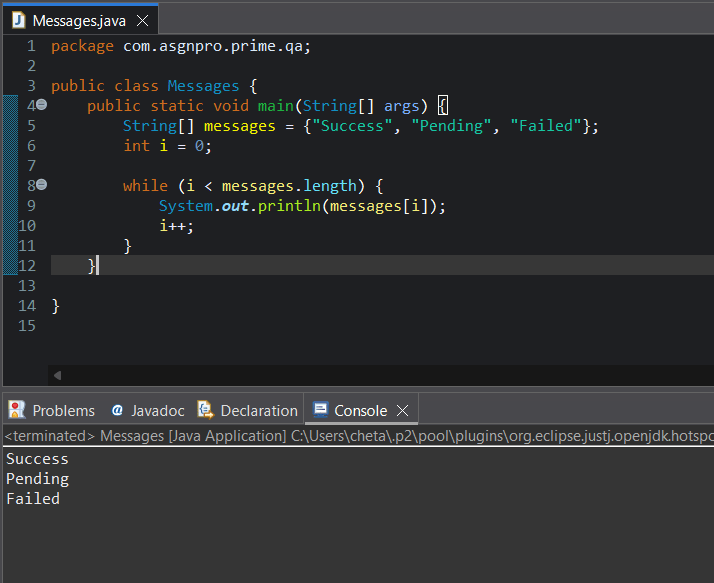
Create String array for transaction messages and Store multiple transaction messages
Create counter variable
Apply while loop for dataset iteration
Print messages one by one
Increment counter value
Execute Java program
Task 3: Process Multiple Transactions
Understand Multiple Transaction Processing
1
What is Multiple Transaction Processing?
Multiple transaction processing means handling large number of transaction records repeatedly using loops.
Banking systems process thousands of records automatically during :-
transaction validation
report generation
daily reconciliation
customer activity monitoring
Types of Transaction Processing
Debit Transaction Processing
Processes debit records repeatedly.
Credit Transaction Processing
Processes credit records repeatedly.
Processes transaction verification automatically.
Real Life Example
FinCheck testing team validates multiple ATM withdrawal transactions before report generation.
Activity
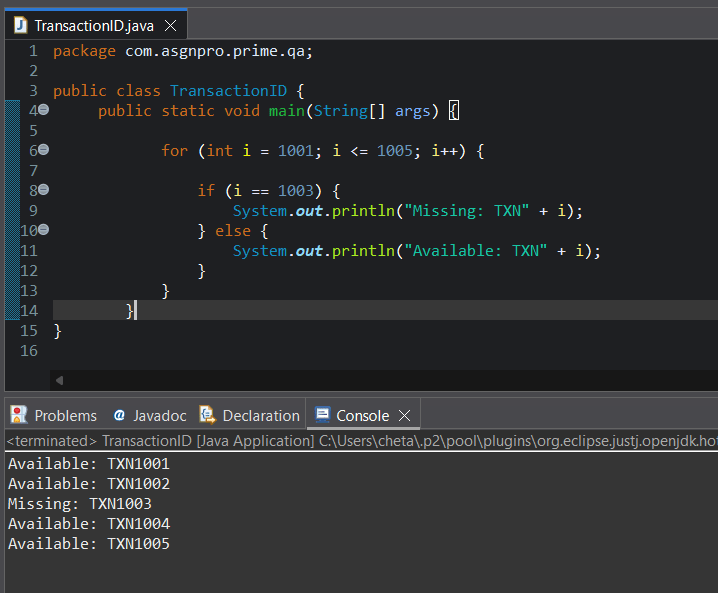
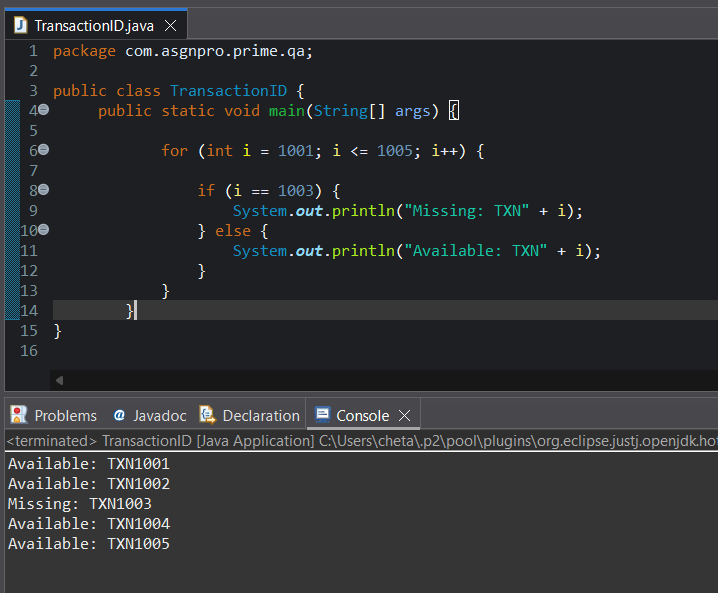
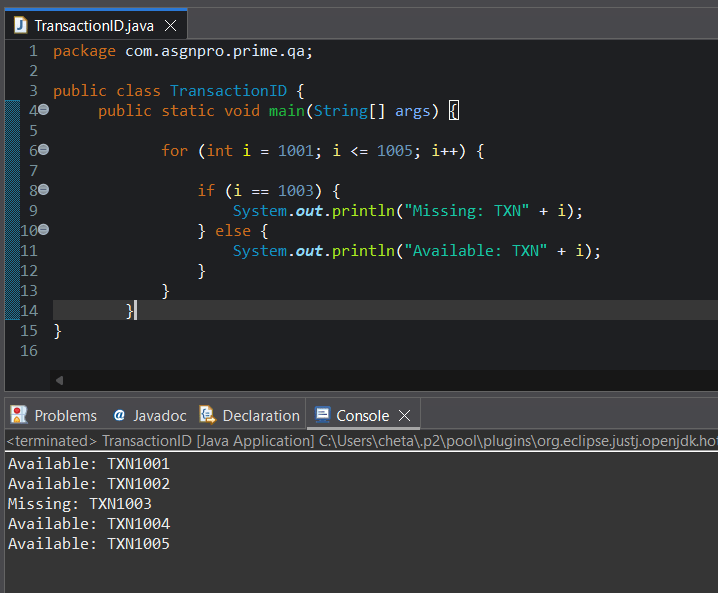
Create for loop for transaction ID processing
Generate transaction sequence from TXN1001 to TXN1005
Apply if condition to validate transaction IDs
Print available transaction IDs
Print missing transaction IDs
Execute Java program
Observe missing transaction validation flow
Task 4: Iterate Transaction Datasets
Understand Dataset Iteration
1
What is Dataset Iteration?
Dataset iteration means processing records one by one from collection of transaction data.
QA testers use iteration to verify :-
transaction records
customer details
validation outputs
report datasets
How Dataset Iteration Works
Loop executes repeatedly.
Each iteration processes one dataset record.
Execution continues until all records are processed.
Real Life Example
Tester validates transaction sequence from TXN1001 to TXN1005 during reconciliation
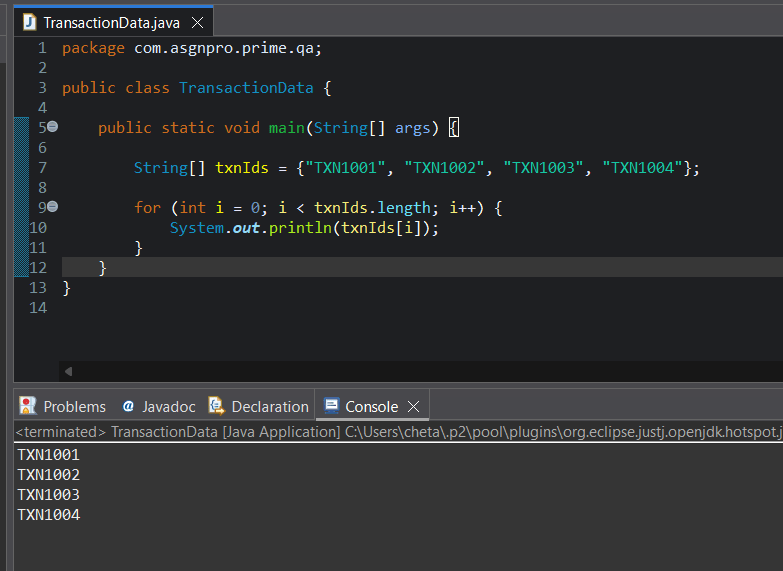
Create transaction dataset using array
Store multiple transaction IDs
Create loop for dataset iteration
Process transaction records one by one
Print transaction dataset records
Execute Java program
Observe dataset iteration flow
Activity
Task 5: Automate Repeated Validation
Understand Repeated Validation
1
What is Repeated Validation?
Repeated validation means validating multiple transaction records automatically using loops.
Instead of manually checking every transaction, loops automate repetitive validation
activities.
Types of Repeated Validation
Transaction Validation
Checks multiple transactions repeatedly.
Balance Validation
Validates balance records continuously.
Record Verification
Processes repeated verification logic.
Real Life Example
Tester validates multiple transaction records automatically during daily reconciliation testing.
Activity
Create transaction ID dataset using array
Store multiple transaction IDs inside array
Create transaction amount dataset using array
Good Job!!
In this lab, you learned about Loops in Java, For and While Loops, Transaction
Checkpoint
Processing, and Repeated Validation Logic.
You also practiced handling Bulk Transaction Data, using Loop Counters, processing Transaction Records, and iterating Transaction Datasets.
By completing this lab, you now understand how QA Testers Use Loops to Process Data, Perform Validations, and Handle Repetitive Testing Operations.
Next-Lab Preparation
Git Push
git push origin branchNameTopic : Java Basic
By Content ITV