

Content ITV
This is Itvedant Content department
Business Scenario
In this lab, we will enhance the Medicare backend by replacing HTTP Basic Authentication with stateless JWT (JSON Web Token) authentication.
Pre-Lab Preparation
Phase 9 — Stateless JWT Authentication
Module:
1) Mastering Springboot Security
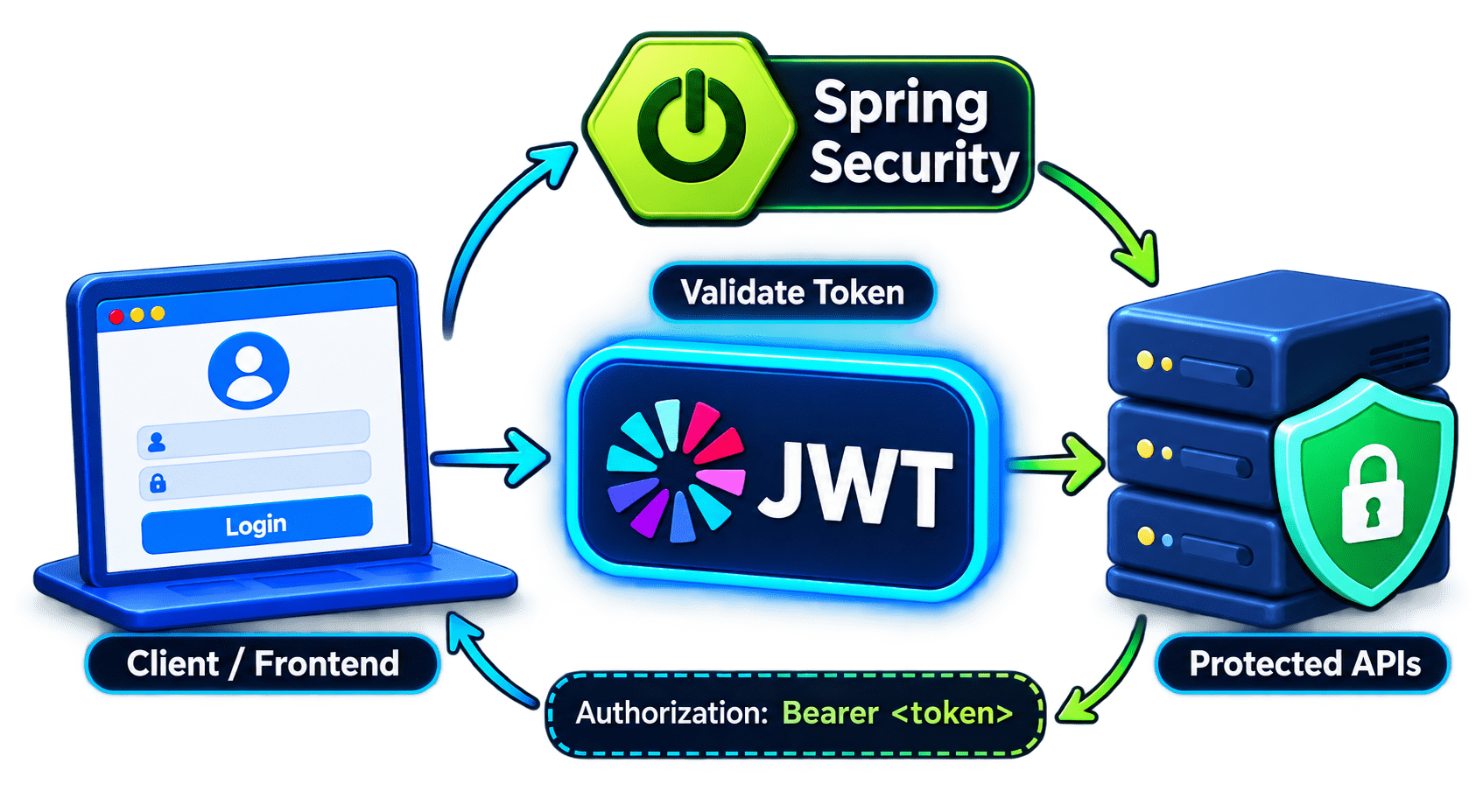
Now we replace HTTP Basic Authentication with the authentication approach our React frontend will eventually use:
Register / Login
       ↓
JWT generated
       ↓
Frontend stores JWT
       ↓
Every protected request sends:

Authorization: Bearer <token>
       ↓
JWT Filter
       ↓
Token validated
       ↓
SecurityContextHolder
       ↓
Controller
What changes from Phase 8 ?
Every Request
     ↓
Email + Password
     ↓
Basic Authentication
LOGIN ONCE
Email + Password
     ↓
    JWT

Then:
Every Request
     ↓
JWT only
AuthenticationManager
UserDetailsService
PasswordEncoder
DaoAuthenticationProvider
SecurityContextHolder
Phase 9 Target APIs
POST /api/auth/register
POST /api/auth/login
Authorization: Bearer <JWT>
Important Security Decision
{
    "role": "PATIENT"
}{
"role": "DOCTOR"
}/api/auth/register ↓ Always PATIENT
Add JWT Dependencies
1
<!-- JWT API -->
<dependency>
    <groupId>io.jsonwebtoken</groupId>
    <artifactId>jjwt-api</artifactId>
    <version>0.13.0</version>
</dependency>

<!-- JWT implementation -->
<dependency>
    <groupId>io.jsonwebtoken</groupId>
    <artifactId>jjwt-impl</artifactId>
    <version>0.13.0</version>
    <scope>runtime</scope>
</dependency>

<!-- JWT JSON processing -->
<dependency>
    <groupId>io.jsonwebtoken</groupId>
    <artifactId>jjwt-gson</artifactId>
    <version>0.13.0</version>
    <scope>runtime</scope>
</dependency>
<!-- JWT JSON processing -->
<dependency>
<groupId>io.jsonwebtoken</groupId>
<artifactId>jjwt-gson</artifactId>
<version>0.13.0</version>
<scope>runtime</scope>
</dependency>Understand JWT Structure
2
xxxxx.yyyyy.zzzzz
HEADER.PAYLOAD.SIGNATURE
{
    "sub": "rahul@example.com",
    "iat": 1789970000,
    "exp": 1790056400
}JWT Secret
3
jwt.secret=mysecret123import javax.crypto.SecretKey;
import io.jsonwebtoken.Jwts;
import io.jsonwebtoken.io.Encoders;
public class JwtSecretGenerator {
public static void main(String[] args) { SecretKey key = Jwts.SIG.HS256.key().build();
String secret = Encoders.BASE64.encode(key.getEncoded());
System.out.println(secret);
}
}Configure JWT Properties
4
# JWT Configuration
jwt.secret=${JWT_SECRET}

# 24 hours in milliseconds
jwt.expiration=86400000
# 24 hours in milliseconds jwt.expiration=86400000
Run Configurations
→ Environment
→ New
Name: JWT_SECRET
Value: your-generated-base64-key
Create Authentication DTOs
5
dto/
├── RegisterRequest.java
├── LoginRequest.java
└── AuthResponse.java
Create RegisterRequest
6
package com.medicare.dto;
import jakarta.validation.constraints.Email;
import jakarta.validation.constraints.NotBlank;
import jakarta.validation.constraints.Pattern;
import jakarta.validation.constraints.Size;
public class RegisterRequest {
@NotBlank(message = "Name is required")
@Size(min = 3,max = 100,message = "Name must be between 3 and 100 characters")
private String name;
@NotBlank(message = "Email is required")
@Email(message = "Please provide a valid email")
private String email;
@NotBlank(message = "Phone number is required")
@Pattern(regexp = "^[0-9]{10,15}$",
message = "Phone number must contain 10 to 15 digits"
)
private String phone;
@NotBlank(message = "Password is required")
@Size(min = 8,max = 100,message = "Password must be between 8 and 100 characters")
private String password;
public String getName() {
return name;
}
public void setName(String name) {
this.name = name;
} public String getEmail() {
return email;
}
public void setEmail(String email) {
this.email = email;
}
public String getPhone() {
return phone;
}
public void setPhone(String phone) {
this.phone = phone;
}
public String getPassword() {
return password;
}
public void setPassword(String password) {
this.password = password;
}
}Create LoginRequest
7
package com.medicare.dto;
import jakarta.validation.constraints.Email;
import jakarta.validation.constraints.NotBlank;

public class LoginRequest {

    @NotBlank(message = "Email is required")
    @Email(message = "Please provide a valid email")
    private String email;

    @NotBlank(message = "Password is required")
    private String password;

    public String getEmail() {
        return email;
    }

    public void setEmail(String email) {
        this.email = email;
    }

    public String getPassword() {
        return password;
    }
public void setPassword(String password) {
this.password = password;
}
}Create AuthResponse
8
JWT
User ID
Name
Email
Role
package com.medicare.dto;
import com.medicare.entity.Role;
public class AuthResponse {

    private String token;
    private String tokenType;

    private Long userId;
    private String name;
    private String email;
    private Role role;

    public AuthResponse(
            String token,
            Long userId,
            String name,
            String email,
            Role role) {

        this.token = token;
        this.tokenType = "Bearer";
        this.userId = userId;
        this.name = name;
        this.email = email;
        this.role = role;
    }

    public String getToken() {
        return token;
    }
public String getTokenType() {
return tokenType;
}
public Long getUserId() {
return userId;
}
public String getName() {
return name;
}
public String getEmail() {
return email;
}
public Role getRole() {
return role;
}
}Update UserRepository
9
package com.medicare.repository;
import java.util.Optional;
import org.springframework.data.jpa.repository.JpaRepository;
import com.medicare.entity.User;

public interface UserRepository
        extends JpaRepository<User, Long> {

    boolean existsByEmailIgnoreCase(String email);

    Optional<User> findByEmailIgnoreCase(String email);
}
Create EmailAlreadyExistsException
10
exception/
└── EmailAlreadyExistsException.javapackage com.medicare.exception;
public class EmailAlreadyExistsExceptionextends RuntimeException {
public EmailAlreadyExistsException(String message) {
super(message);
}
}Create JwtService
11
security/
└── JwtService.java
package com.medicare.security;
import java.util.Date;
import javax.crypto.SecretKey;
import org.springframework.beans.factory.annotation.Value;
import org.springframework.security.core.userdetails.UserDetails;
import org.springframework.stereotype.Service;
import io.jsonwebtoken.Claims;
import io.jsonwebtoken.Jwts;
import io.jsonwebtoken.io.Decoders;
import io.jsonwebtoken.security.Keys;Generate JWT Read JWT Extract Username Check Expiry Validate JWT
@Service
public class JwtService {

    @Value("${jwt.secret}")
    private String jwtSecret;

    @Value("${jwt.expiration}")
    private long jwtExpiration;

    public String generateToken(v  UserDetails userDetails) {

        long currentTime = System.currentTimeMillis();

        return Jwts.builder().subject(userDetails.getUsername())
                .issuedAt(new Date(currentTime))
                .expiration(new Date(currentTime+ jwtExpiration))
                .signWith(getSigningKey()).compact();
    }

    public String extractUsername(String token) {
        return extractAllClaims(token).getSubject();
    }

    public boolean isTokenValid(String token,UserDetails userDetails) {

        String username = extractUsername(token);

        return username.equals(userDetails.getUsername())
                && !isTokenExpired(token);
}
private boolean isTokenExpired(String token) {
Date expiration = extractAllClaims(token).getExpiration();
return expiration.before(new Date());
}
private Claims extractAllClaims(String token) {
return Jwts.parser().verifyWith(getSigningKey())
.build().parseSignedClaims(token).getPayload();
}
private SecretKey getSigningKey() {
byte[] keyBytes = Decoders.BASE64.decode(jwtSecret);
return Keys.hmacShaKeyFor(keyBytes);
}
}Understand Token Generation
.subject(userDetails.getUsername())
rahul@example.com, which identifies the user associated with the token..issuedAt(...) method records the date and time when the token was created..expiration(...) method specifies when the token becomes invalid and can no longer be used for authentication..signWith(getSigningKey()) method digitally signs the token using a secret key to protect its integrityrahul@example.com to admin@example.com, the signature verification fails because the token has been tampered with.Create AuthService
12
service/
└── AuthService.java
package com.medicare.service;
import org.springframework.security.authentication.AuthenticationManager;
import org.springframework.security.authentication.UsernamePasswordAuthenticationToken;
import org.springframework.security.core.userdetails.UserDetails;
import org.springframework.security.crypto.password.PasswordEncoder;
import org.springframework.stereotype.Service;
import com.medicare.dto.AuthResponse;
import com.medicare.dto.LoginRequest;
import com.medicare.dto.RegisterRequest;
import com.medicare.dto.UserResponse;
import com.medicare.entity.Role;
import com.medicare.entity.User;
import com.medicare.exception.EmailAlreadyExistsException;
import com.medicare.exception.UserNotFoundException;
import com.medicare.repository.UserRepository;service/
└── AuthService.javaimport com.medicare.security.JwtService;
@Service
public class AuthService {
private final UserRepository userRepository;
private final PasswordEncoder passwordEncoder;
private final AuthenticationManager authenticationManager;
private final JwtService jwtService;
public AuthService(UserRepository userRepository,PasswordEncoder passwordEncoder,
AuthenticationManager authenticationManager,JwtService jwtService) {
this.userRepository = userRepository;
this.passwordEncoder = passwordEncoder;
this.authenticationManager = authenticationManager;
this.jwtService = jwtService;
}
public UserResponse register(RegisterRequest request) {
String email = request.getEmail().trim().toLowerCase();
if (userRepository.existsByEmailIgnoreCase(email)) {
throw new EmailAlreadyExistsException("Email is already registered");
}
User user = new User();
user.setName(request.getName().trim());service/
└── AuthService.java user.setEmail(email);
user.setPhone(request.getPhone());
user.setPassword(passwordEncoder.encode(request.getPassword()));
/*
* Public registration always creates
* a PATIENT account.
*/
user.setRole(Role.PATIENT);
User savedUser = userRepository.save(user);
return mapToUserResponse(savedUser);
}
public AuthResponse login(LoginRequest request) {
String email = request.getEmail().trim().toLowerCase();
/*
* AuthenticationManager checks
* email and password.
*/
var authentication = authenticationManager.authenticate(
new UsernamePasswordAuthenticationToken(email,
request.getPassword()));
UserDetails userDetails = (UserDetails)authentication.getPrincipal();service/
└── AuthService.java User user = userRepository.findByEmailIgnoreCase(userDetails.getUsername())
.orElseThrow(() -> new UserNotFoundException(
"User not found"));
String token = jwtService.generateToken(userDetails);
return new AuthResponse(
token,user.getId(),user.getName(),user.getEmail(),user.getRole()
);
}
private UserResponse mapToUserResponse(User user) {
return new UserResponse(
user.getId(),
user.getName(),
user.getEmail(),
user.getPhone(),
user.getRole()
);
}
}Create AuthController
13
service/
└── AuthService.javapackage com.medicare.controller;
import org.springframework.http.H ttpStatus;
import org.springframework.http.ResponseEntity;
import org.springframework.web.bind.annotation.PostMapping;
import org.springframework.web.bind.annotation.RequestBody;
import org.springframework.web.bind.annotation.RequestMapping;
import org.springframework.web.bind.annotation.RestController;
import com.medicare.dto.AuthResponse;
import com.medicare.dto.LoginRequest;
import com.medicare.dto.RegisterRequest;
import com.medicare.dto.UserResponse;
import com.medicare.service.AuthService;
import jakarta.validation.Valid;
@RestController
@RequestMapping("/api/auth")
public class AuthController {
private final AuthService authService;controller/
└── AuthController.javaservice/
└── AuthService.java public AuthController(AuthService authService) {
this.authService = authService;
}
@PostMapping("/register")
public ResponseEntity<UserResponse>
register(@Valid @RequestBody RegisterRequest request) {
UserResponse response = authService.register(request);
return ResponseEntity.status(HttpStatus.CREATED).body(response);
}
@PostMapping("/login")
public ResponseEntity<AuthResponse>
login( @Valid @RequestBody LoginRequest request) {
return ResponseEntity.ok(authService.login(request)
);
}
}Remove Public User Creation
Create JWT Authentication Filter
14
security/
└── JwtAuthenticationFilter.java
package com.medicare.security;
import java.io.IOException;
import org.springframework.http.HttpHeaders;
import org.springframework.security.authentication.
UsernamePasswordAuthenticationToken;
import org.springframework.security.core.context.SecurityContextHolder;
import org.springframework.security.core.userdetails.UserDetails;
import org.springframework.security.web.authentication.
WebAuthenticationDetailsSource;
import org.springframework.stereotype.Component;
import org.springframework.web.filter.OncePerRequestFilter;
import io.jsonwebtoken.JwtException;
import jakarta.servlet.FilterChain;
import jakarta.servlet.ServletException;
import jakarta.servlet.http.HttpServletRequest;
import jakarta.servlet.http.HttpServletResponse;security/
└── JwtAuthenticationFilter.java@Component
public class JwtAuthenticationFilter extends OncePerRequestFilter {
private final JwtService jwtService;
private final CustomUserDetailsService userDetailsService;
public JwtAuthenticationFilter( JwtService jwtService,
CustomUserDetailsService userDetailsService) {
this.jwtService = jwtService;
this.userDetailsService = userDetailsService;
}
@Override
protected void doFilterInternal( HttpServletRequest request,
HttpServletResponse response,FilterChain filterChain)
throws ServletException, IOException {
String authHeader = request.getHeader( HttpHeaders.AUTHORIZATION);
/*
* No Bearer token?
* Continue the filter chain.
*/
if (authHeader == null || !authHeader.startsWith("Bearer ")) {
filterChain.doFilter(request,response);
return;
}security/
└── JwtAuthenticationFilter.java String token = authHeader.substring(7);
try {
String username = jwtService.extractUsername(token);
if (username != null && SecurityContextHolder
.getContext().getAuthentication() == null) {
UserDetails userDetails = userDetailsService
.loadUserByUsername(username);
if (jwtService.isTokenValid(token,userDetails)) {
UsernamePasswordAuthenticationToken
authenticationToken =
new UsernamePasswordAuthenticationToken(
userDetails,null,userDetails
.getAuthorities()
);
authenticationToken.setDetails(
new WebAuthenticationDetailsSource()
.buildDetails(request)
);
SecurityContextHolder.getContext()
.setAuthentication(authenticationToken);
}
} } catch ( JwtException | IllegalArgumentException exception) {
/*
* Invalid / expired / malformed token.
* Leave the user unauthenticated.
*/
SecurityContextHolder.clearContext();
}
filterChain.doFilter(request,response);
}
}Understand Bearer
Filter Logic
Request
   ↓
Authorization header exists?
   │
   ├── NO → continue
   │
   └── YES
        ↓
Starts with Bearer?
        ↓
Extract JWT
        ↓
Extract Email
        ↓
Load UserDetails
        ↓
Validate Signature
        ↓
Validate Expiration
        ↓
Valid?
   ┌────┴────┐
   NO       YES
   │         │
   ▼         ▼
No Auth   Authentication object
             ↓
      SecurityContextHolder
Update SecurityConfig
15
package com.medicare.config;
import org.springframework.context.annotation.Bean;
import org.springframework.context.annotation.Configuration;
import org.springframework.http.HttpStatus;
import org.springframework.security.authentication.AuthenticationManager;STATELESS session management JWT filter Public auth endpoints
import org.springframework.security.authentication.AuthenticationProvider;
import org.springframework.security.authentication.dao.DaoAuthenticationProvider;
import org.springframework.security.config.annotation.authentication.configuration.
AuthenticationConfiguration;
import org.springframework.security.config.annotation.web.builders.HttpSecurity;
import org.springframework.security.config.http.SessionCreationPolicy;
import org.springframework.security.crypto.bcrypt.BCryptPasswordEncoder;
import org.springframework.security.crypto.password.PasswordEncoder;
import org.springframework.security.web.SecurityFilterChain;
import org.springframework.security.web.authentication.HttpStatusEntryPoint;
import org.springframework.security.web.authentication.
UsernamePasswordAuthenticationFilter;
import com.medicare.security.CustomUserDetailsService;
import com.medicare.security.JwtAuthenticationFilter;

@Configuration
public class SecurityConfig {
    @Bean
    public PasswordEncoder passwordEncoder() {
        return new BCryptPasswordEncoder();
    }

    @Bean
    public AuthenticationProvider authenticationProvider(
            CustomUserDetailsService userDetailsService,
            PasswordEncoder passwordEncoder) {

        DaoAuthenticationProvider provider =new DaoAuthenticationProvider(
                        userDetailsService );
provider.setPasswordEncoder(passwordEncoder);
return provider;
}
@Bean
public AuthenticationManager authenticationManager(
AuthenticationConfiguration configuration)
throws Exception {
return configuration.getAuthenticationManager();
}
@Bean
public SecurityFilterChain securityFilterChain(
HttpSecurity http,
AuthenticationProvider authenticationProvider,
JwtAuthenticationFilter jwtAuthenticationFilter)
throws Exception {
http.csrf(csrf ->csrf.disable())
/*
* JWT authentication is stateless.
* Spring Security should not create
* an authentication session.
*/
.sessionManagement(session ->session.sessionCreationPolicy(
SessionCreationPolicy.STATELESS)
) .authenticationProvider(authenticationProvider)
.authorizeHttpRequests(auth ->auth
.requestMatchers("/api/health").permitAll()
.requestMatchers("/api/auth/register","/api/auth/login")
.permitAll().anyRequest().authenticated()
)
/*
* Return 401 when authentication
* is missing or invalid.
*/
.exceptionHandling(exception -> exception.authenticationEntryPoint(
new HttpStatusEntryPoint(HttpStatus.UNAUTHORIZED)
)
)
/*
* JWT must be checked before
* username/password authentication filter.
*/
.addFilterBefore(jwtAuthenticationFilter,
UsernamePasswordAuthenticationFilter.class
);
return http.build();
}
}Filter Logic
Login
 ↓
Server creates Session
 ↓
Server remembers User
Login
 ↓
Server creates JWT
 ↓
Client holds JWT
 ↓
Server validates JWT on every request
Update Global Exception Handler
16
@ExceptionHandler(EmailAlreadyExistsException.class)

public ResponseEntity<ErrorResponse> handleEmailAlreadyExists(
                EmailAlreadyExistsException exception,
                HttpServletRequest request) {

    ErrorResponse errorResponse = new ErrorResponse(
                    LocalDateTime.now(),
                    HttpStatus.CONFLICT.value(),
                    exception.getMessage(),
                    request.getRequestURI()
            );

    return ResponseEntity
            .status(HttpStatus.CONFLICT).body(errorResponse);
}
Handle Wrong Login Credentials
17
@ExceptionHandler( BadCredentialsException.class)
public ResponseEntity<ErrorResponse>
        handleBadCredentials(
                BadCredentialsException exception,
                HttpServletRequest request) {

    ErrorResponse errorResponse = new ErrorResponse(
                    LocalDateTime.now(),
                    HttpStatus.UNAUTHORIZED.value(),
                    "Invalid email or password",
                    request.getRequestURI()
            );

    return ResponseEntity
            .status(HttpStatus.UNAUTHORIZED).body(errorResponse);
}Test Registration
18
POST http://localhost:8080/api/auth/register
{
    "name": "Rahul Shah",
    "email": "rahul@example.com",
    "phone": "9876543210",
    "password": "Rahul@123"
}{
"id": 1,
"name": "Rahul Shah",
"email": "rahul@example.com",
"phone": "9876543210",
"role": "PATIENT"
}Check Password in Database
19
SELECT id, email, password, role FROM users;email: rahul@example.com password: $2a$10$.... role: PATIENT
Duplicate Registration
20
Expected: 409 CONFLICT
{
    "timestamp": "...",
    "status": 409,
    "message": "Email is already registered",
    "path": "/api/auth/register"
}
Send the same email again.
Expected: 409 CONFLICT
Test Login
21
POST http://localhost:8080/api/auth/login
{
    "email": "rahul@example.com",
    "password": "Rahul@123"
}
Body:
Test Wrong password
22
{
    "email": "rahul@example.com",
    "password": "WrongPassword"
}
{
"status": 401,
"message": "Invalid email or password"
}Expected: 401 UNAUTHORIZED
Protected API Without JWT
23
GET http://localhost:8080/api/doctors
Protected API With JWT
24
Authorization
→ Bearer Token
GET http://localhost:8080/api/doctors
Modify the Token
25
For example: eyJ...
Change one character in the JWT.
GET /api/doctors
Test Expiration
26
We are done with this lab. The latest source code has been uploaded to GitHub. You can access the latest commit using the link below:
Great job!
You have successfully implemented stateless JWT authentication in the Medicare backend.
Checkpoint
Git Push
git push origin branchNameNext-Lab Preparation
Module:
1) Mastering Springboot Security
By Content ITV