




















Content ITV PRO
This is Itvedant Content department
Learning Outcome
4
View results in HTML/JSON format
3
Analyze failures using error details
2
Understand pass/fail status of scenarios
1
Generate test execution reports
5
Use reports for debugging and tracking test results
Before learning reporting in Cucumber, you should recall:
Basics of test execution flow (feature file → step definitions → execution)
Understanding of pass/fail scenarios in automation tests
Basic HTML structure and reading simple reports
Awareness of test results from tools like Selenium/TestNG
How failures are identified in automation scripts
This helps you easily understand how reports are generated and analyzed in BDD.
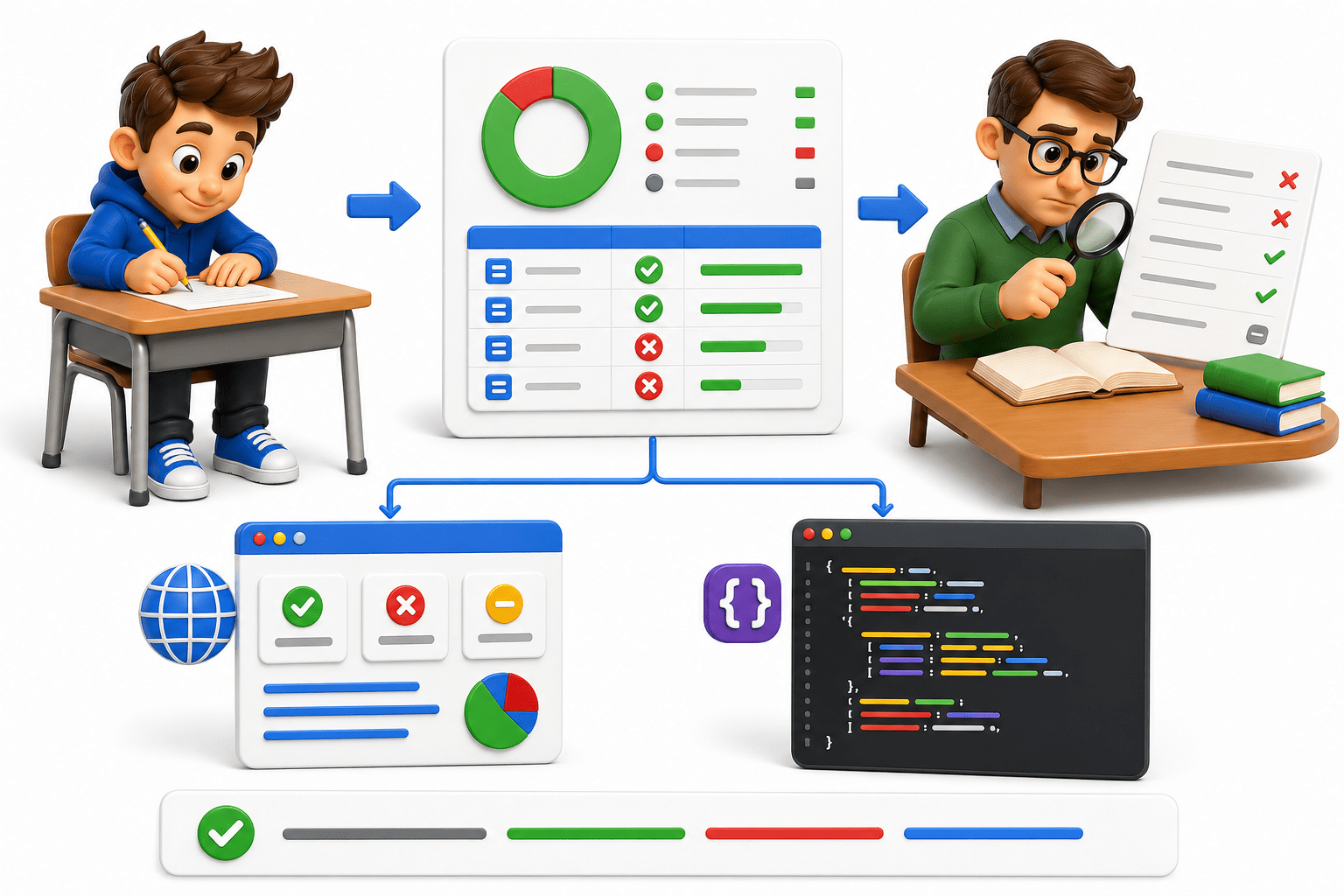
Test execution = Exam writing
Students (test cases) complete their exams step by step.
Reports = Result sheet
After exams, results are published showing:
Pass / Fail
Marks scored
Subject-wise performance
Failure details = Answer sheet review
If a student fails, teachers check exactly which question went wrong (error logs/steps).
HTML/JSON reports = Different result formats
JSON = structured data for system processing
HTML = easy-to-read marksheet
BDD reporting is like a result system that tells what passed, what failed, and why it failed.
Why do we use reporting in BDD?
Show test execution results (pass/fail/skip)
Better Control Over Execution
In Cucumber, reporting is used to:
Provide clear visibility of scenario and step status
Help in identifying where and why a test failed
Generate readable reports (HTML/JSON) for analysis
Improve debugging and test tracking in automation
Reporting in BDD is used to track test results and easily understand test execution outcomes and failures.
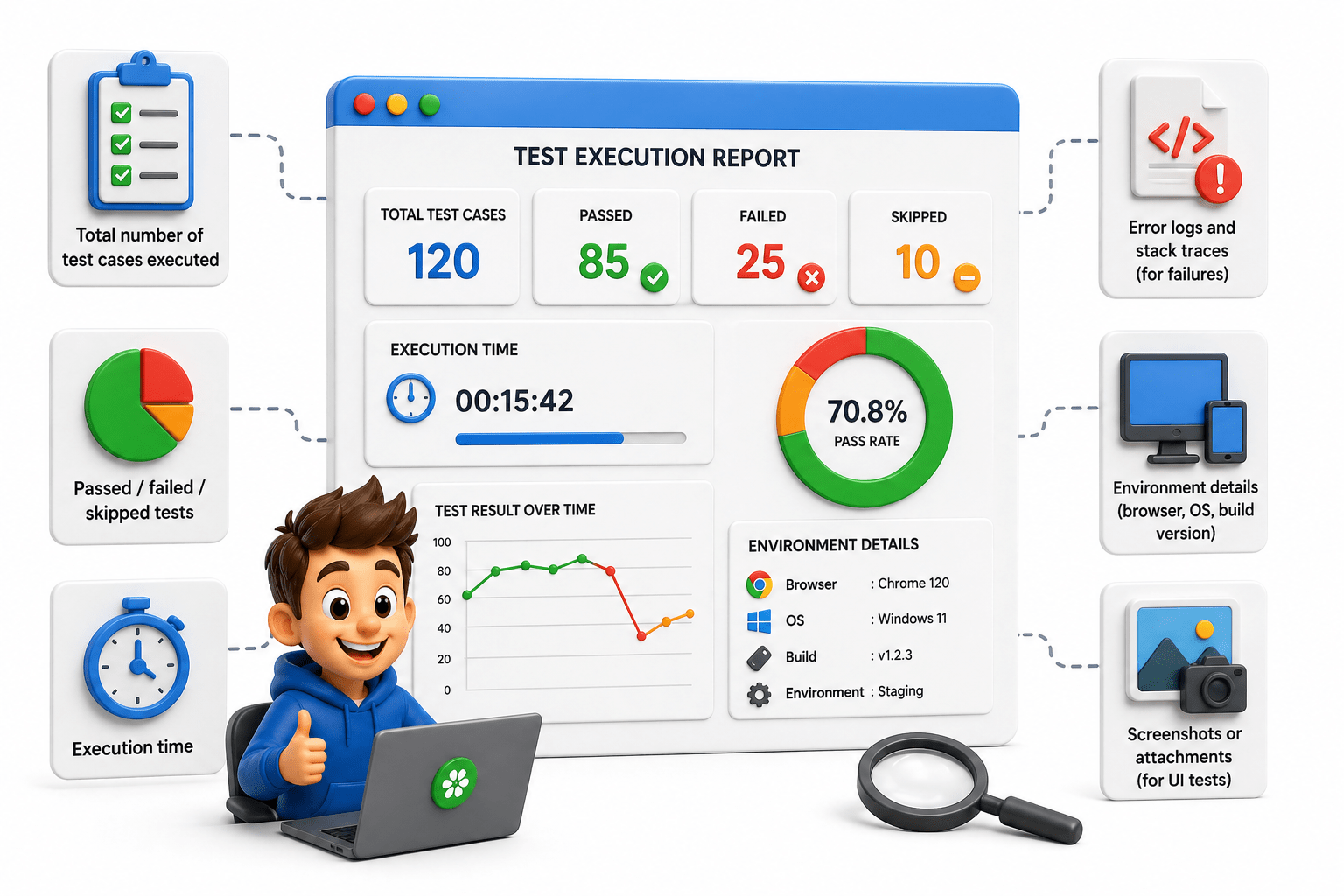
A test execution report is a structured document (HTML, JSON, XML, etc.) that summarizes the results of automated or manual test runs.
It typically includes:
What is a Test Execution Report?
Reporting in BDD
Clear mapping between business scenarios and test results
Easy readability for technical and non-technical stakeholders
Detailed insights into pass/fail status, steps, and errors
In Behavior Driven Development (BDD) using Cucumber and Selenium WebDriver, reporting plays a key role in understanding how well the application behaves against defined business scenarios written in Gherkin language.
BDD reports provide:
Types of Cucumber Reports
HTML Reports (Human Readable)
Easy to view in browser
Color-coded results
Step-by-step scenario breakdown
<plugin>
 <groupId>net.masterthought</groupId>
 <artifactId>maven-cucumber-reporting</artifactId>
</plugin>
Maven Plugin:
Green → Passed step
Red → Failed steps
Skipped → Not executed steps
JSON Reports (Machine Readable)
[
 {
   "name": "Login Scenario",
   "status": "passed",
   "steps": [
     { "step": "Given user is on login page", "result": "passed" },
     { "step": "When user enters valid credentials", "result": "passed" },
     { "step": "Then user should be logged in", "result": "passed" }
   ]
 }
]
mvn test -Dcucumber.plugin="json:target/report.json"
Maven Plugin:
Used for:
CI/CD pipelines
Custom dashboards
Data analysis
JUnit Reports (XML Format)
Standard format for CI tools
Used for integration with Jenkins
Summary
4
Supports multiple report formats like HTML, JSON, and XML.
3
Captures error messages and stack traces for failed steps.
2
Shows status of features, scenarios, and steps (Pass/Fail/Skip).
1
Provides test execution results in a readable format (BDD style).
Quiz
Which formats are commonly used for Cucumber reports?
A.PDF, DOC, TXT
B.HTML, JSON, XML
C.JPG, PNG, GIF
D.EXE, DLL, BIN
Which formats are commonly used for Cucumber reports?
A.PDF, DOC, TXT
B.HTML, JSON, XML
C.JPG, PNG, GIF
D.EXE, DLL, BIN
Quiz-Answer
By Content ITV