Introduction to Agentic AI
Frontend Issues
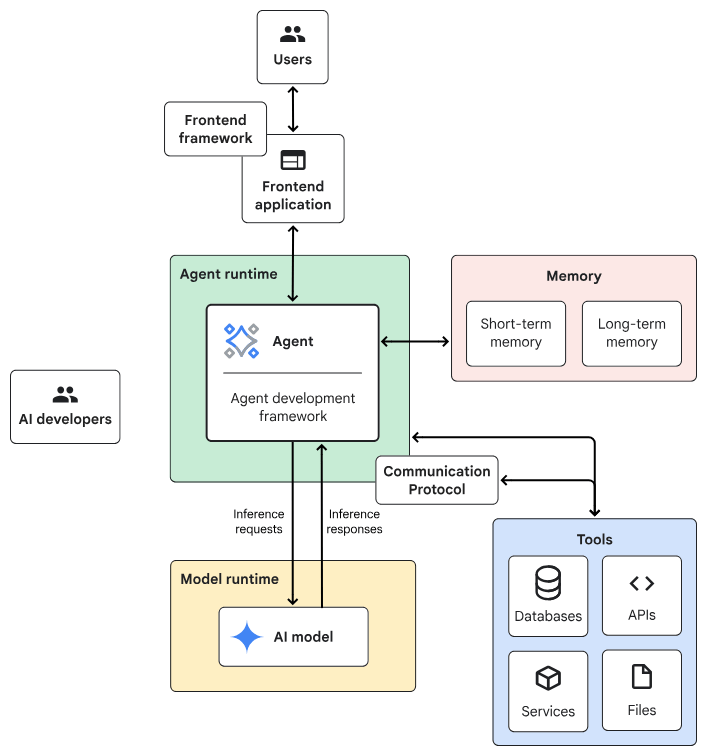
Agentic AI System Architecture
- Frontend:預先建構的元件、程式庫和工具集合,用於建構UI。
- Agent development framework:建構及架構agent的framework與程式庫。
- Tools:工具集合,例如 API、服務、函式與資源。
- Memory:儲存及回想資訊的子系統。
- Design Pattern:Agentic AI常見的運作方法。
- Agent runtime:執行、運算環境。
- AI 模型:核心推論引擎。
- Model runtime:用於代管及提供 AI 模型的基礎架構。
一般伺服器
Planner-Executor
AI伺服器
Chain-lit
React + FastAPI
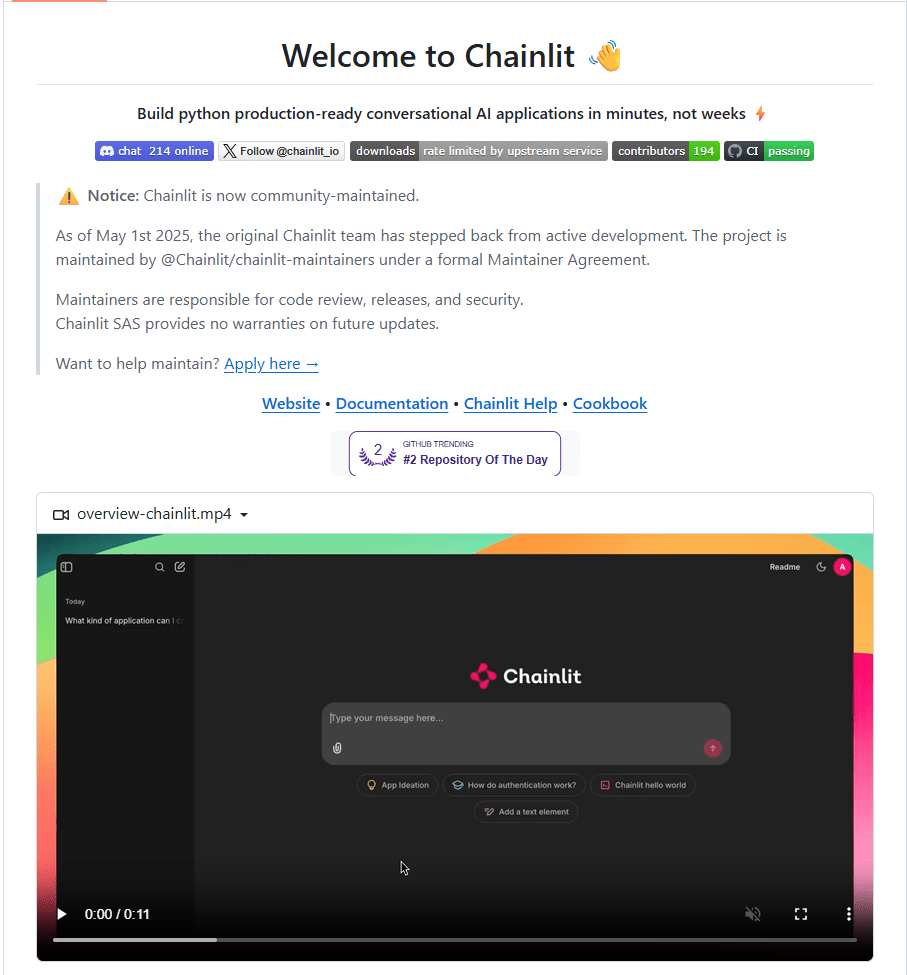
Chainlit
Building interactive interfaces for your LLM-powered applications
What Is Chainlit?
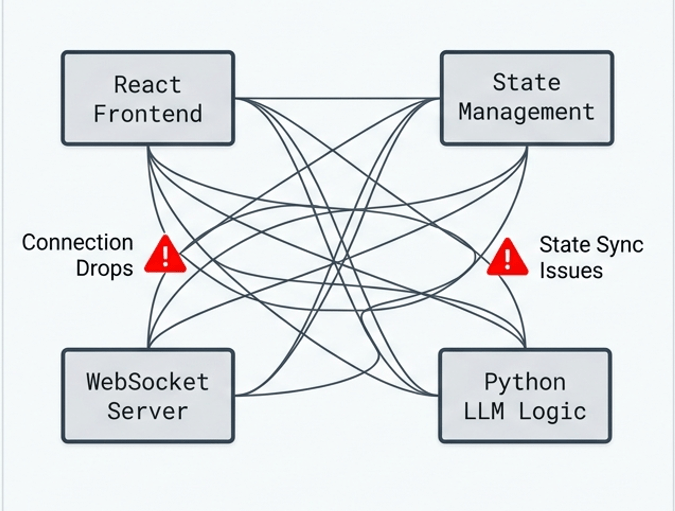
asynchronization issue of AI Agent System
Source: 生成
What Is Chainlit?
Chainlit: open-source Python package to build Conversational AI
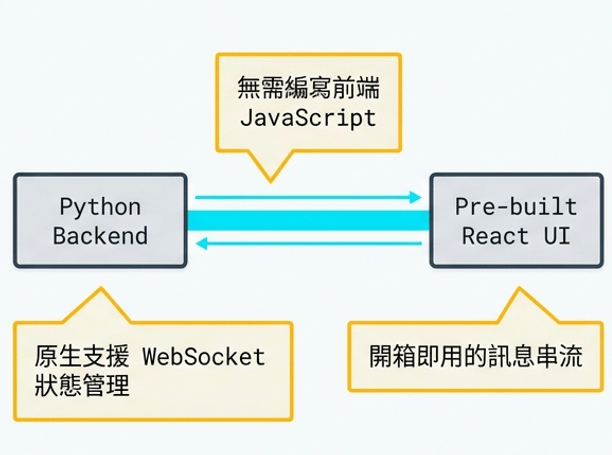
無須編寫前端
原生支援
狀態管理
開箱即用的訊息串流
Source: 生成
What Is Chainlit?
What Is Chainlit? UI Action and callback
Source: 生成
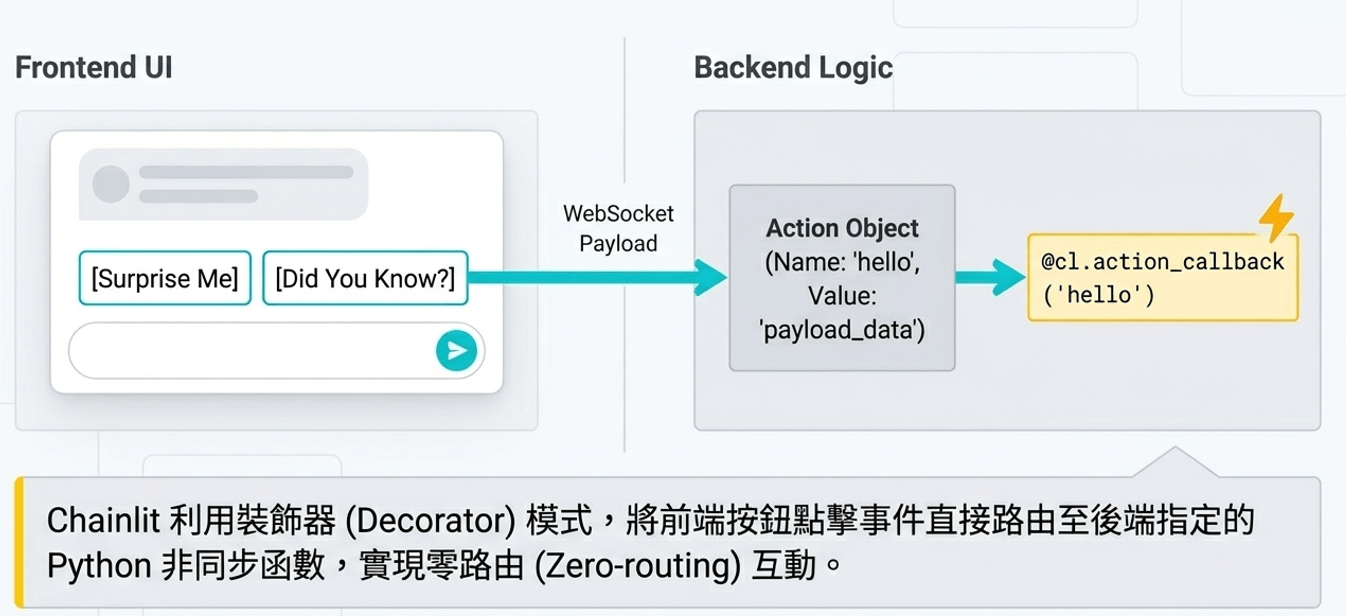
透過Decorator設定callback函式
UI 按鈕指定處理的callback函式
也包含payload設定
import chainlit as cl
#...
### Action buttons
actions = [
    cl.Action(
        name="surprise_button",
        label="🎁 Surprise Me",
        icon="gift",
        payload={"value": "surprise"}
    ),
#...
]
import chainlit as cl
#...
### on_action_callback: 處理suprise_button 點擊事件
@cl.action_callback("surprise_button")
async def on_surprise(action: cl.Action):
    await cl.Message(content="思考中...").send()
    prompt = "請給我一個隨機的驚喜,用繁體中文回答,簡短即可"
    #...呼叫LLM等動作
    #......
What Is Chainlit? Message Streaming
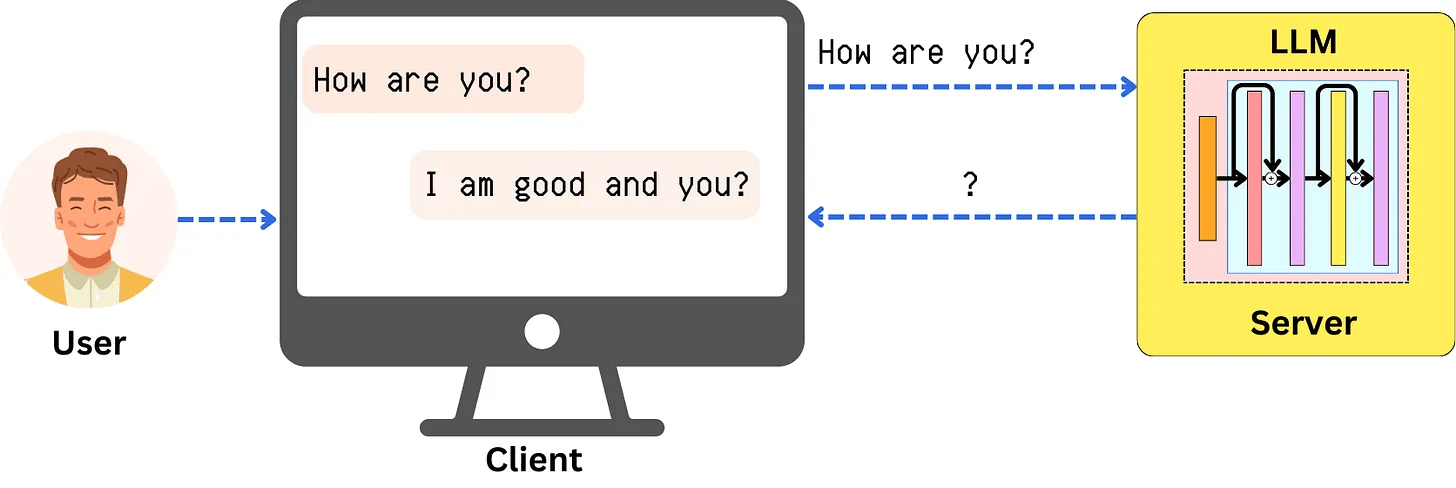
Message Streaming: 逐字顯示(便於閱讀)
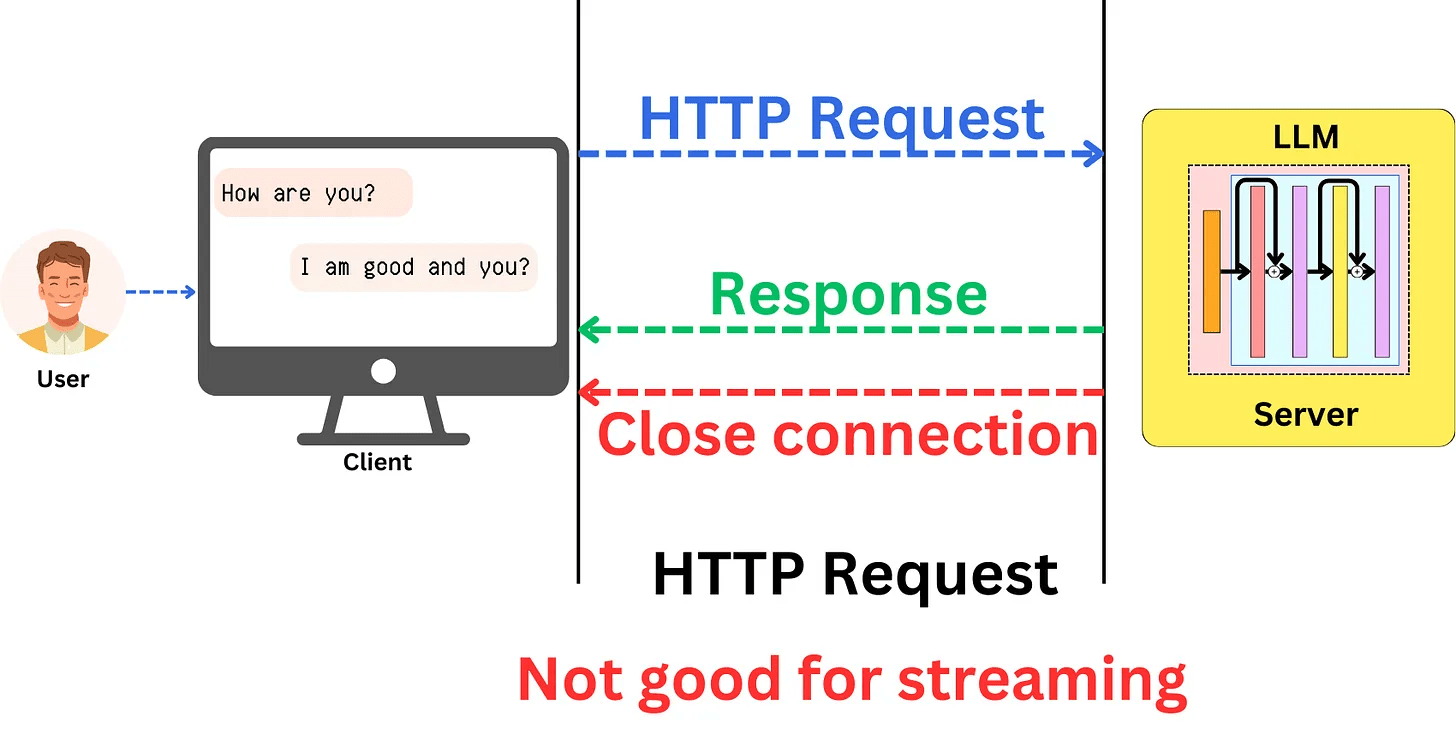
但標準HTTP協定回應後直接關閉連線
無法達成Streaming效果
Capability of Response Update
What Is Chainlit? Message Streaming
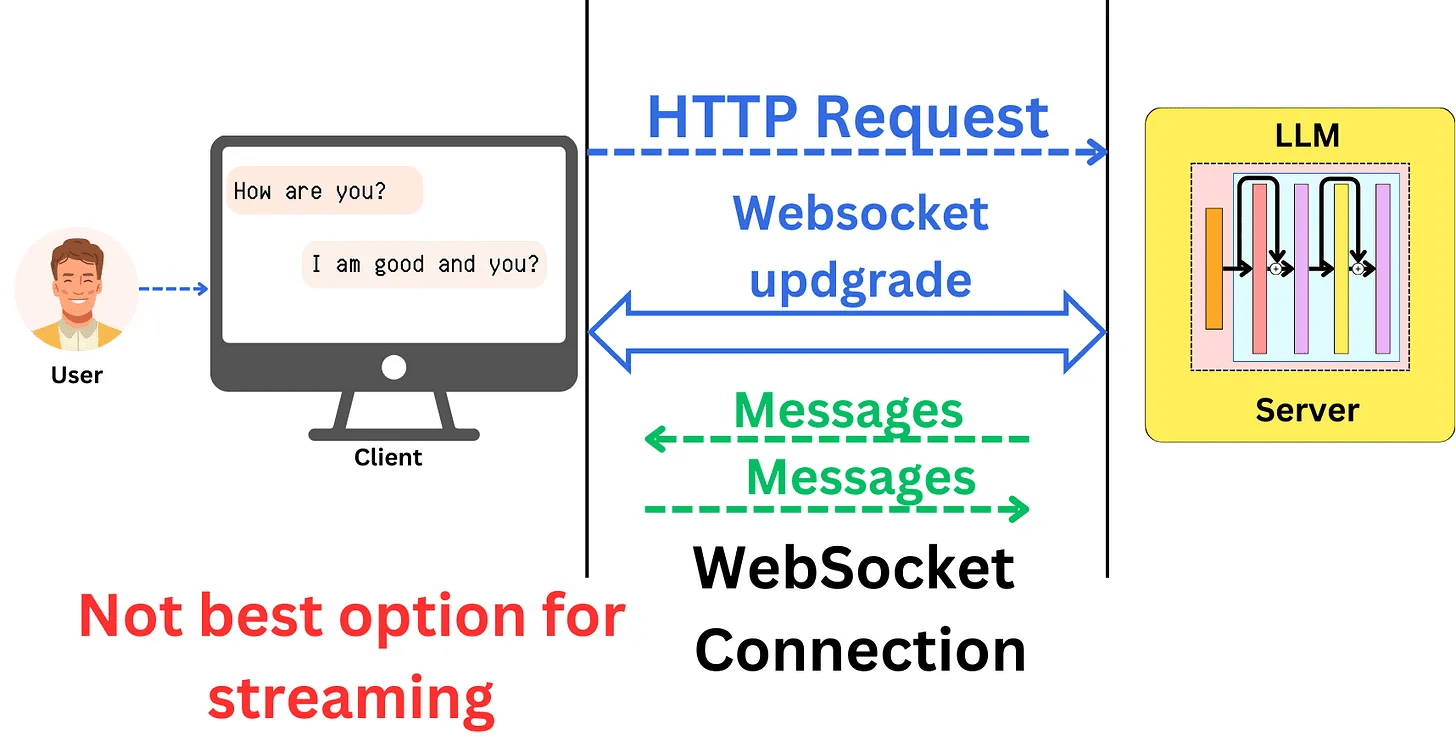
What Is Chainlit? Message Streaming
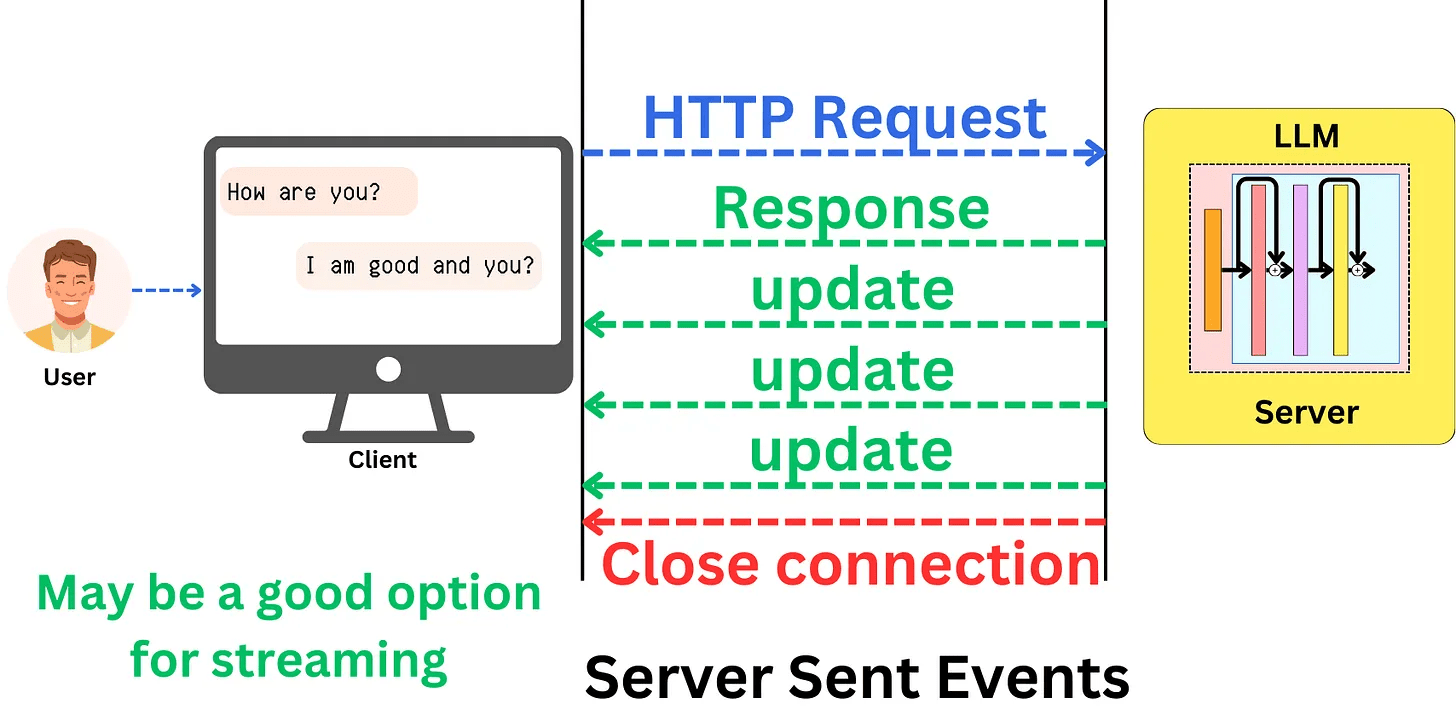
Web Socket or Server Side Event都是實作的選項 !
What Is Chainlit? Message Streaming機制
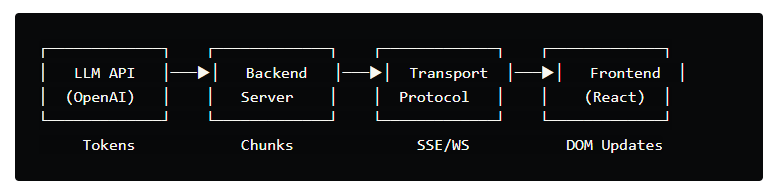
1. LLM API Layer: The provider sends tokens as they're generated
2. Backend Server: Transforms API responses into a format suitable for your transport
3. Transport Protocol: How you send data to the browser (SSE, WebSockets, or HTTP streaming)
4. Frontend Rendering: Efficiently updating the DOM without causing jank
What Is Chainlit? Chainlit Message Streaming機制
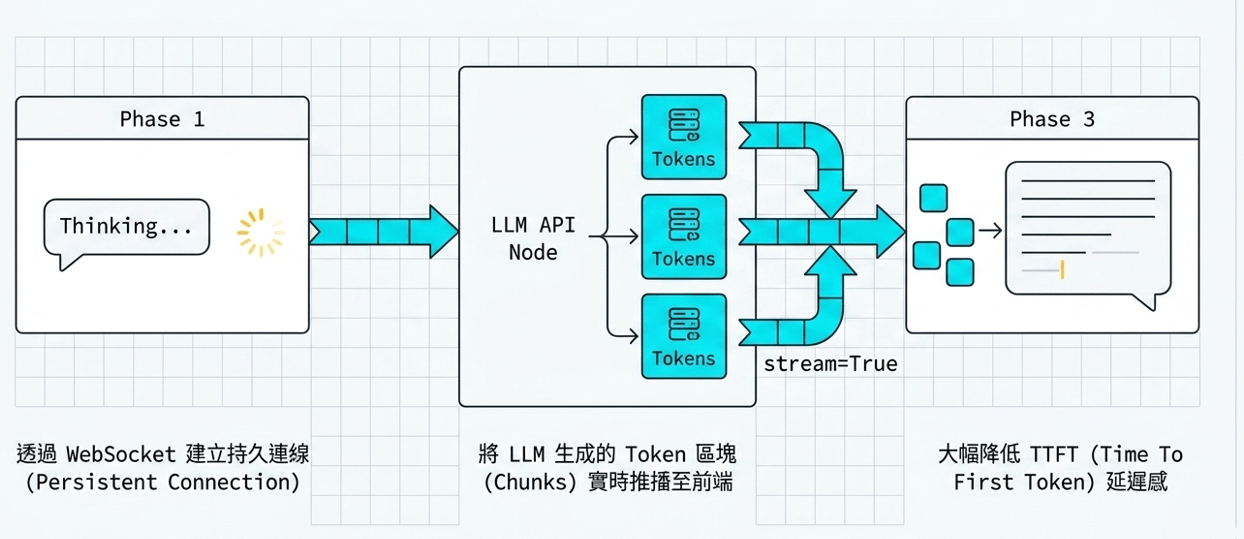
Source: 生成
⚠️ 重要:資安提醒
近期發現名為「Chainleak」的高風險漏洞:
- CVE-2026-22218: 任意檔案讀取漏洞
- CVE-2026-22219: SSRF 伺服器端請求偽造
- 解決方案: 請務必升級至 2.9.4 或以上版本
Chainlit環境準備與安裝
- 系統要求:Python 3.8+
pip install chainlitchainlit hello- 安裝
- 執行測試
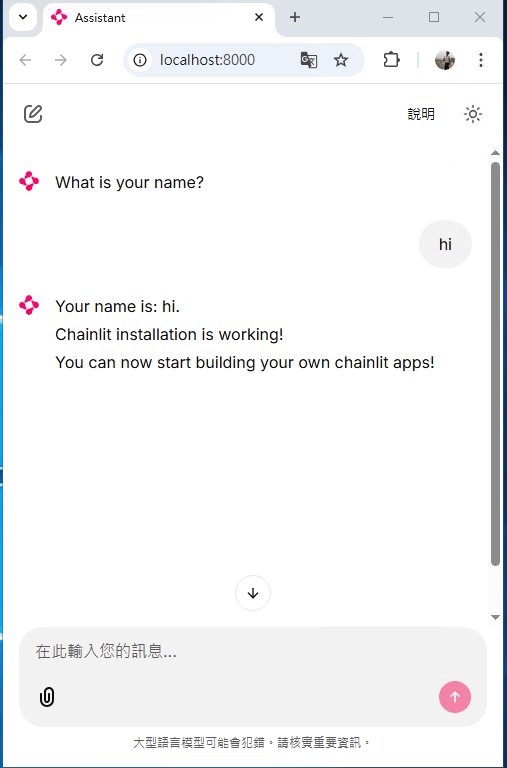
Chainlit demo
import chainlit as cl

@cl.step(type="tool")
async def tool():
    # Fake tool
    await cl.sleep(2)
    return "Response from the tool!"

@cl.on_message  # this function will be called every time a user inputs a message in the UI
async def main(message: cl.Message):
    """
    This function is called every time a user inputs a message in the UI.
    It sends back an intermediate response from the tool, followed by the final answer.

    Args:
        message: The user's message.

    Returns:
        None.
    """

    # Call the tool
    tool_res = await tool()

    await cl.Message(content=tool_res).send()
demo.py
chainlit run demo.pyChainlit life cycle hooks
透過 Decorators 控制對話階段:
@cl.on_chat_start:新工作階段開始時觸發,用於初始化。@cl.on_message:接收使用者訊息時觸發。@cl.on_stop:使用者點擊停止按鈕 (⏹) 時觸發。@cl.on_chat_end:分頁關閉或重新整理時觸發。
Chainlit life cycle hooks
import chainlit as cl
import asyncio

## chat lifecycle hooks #1
@cl.on_chat_start
def on_chat_start():
    print("新一輪對話開始")

## chat lifecycle hooks #2
@cl.on_message
async def on_message(msg: cl.Message):
    print("使用者訊息:", msg.content)
    await cl.Message(content=f"你說: {msg.content}").send()

## chat lifecycle hooks #3 取消對話
@cl.on_stop
async def on_stop():
    print("對話已取消")

def main():
    print("Hello from au-student-agent!")

if __name__ == "__main__":
    asyncio.run(main())
hello.py
chainlit run hello.pyChainlit life cycle hooks
import chainlit as cl
import asyncio

## chat lifecycle hooks #1
@cl.on_chat_start
async def on_chat_start():
    await cl.Message(content="哈囉!我是你的專屬學習小幫手,有什麼可以幫你的嗎?").send()

## chat lifecycle hooks #2
@cl.on_message
async def on_message(msg: cl.Message):
    await cl.Message(content=f"思考中...可以按一下停止鍵來取消對話").send()
    try:
        await asyncio.sleep(10)  # 模擬LLM思考時間較久的情形
        await cl.Message(content="思考完成!").send()
    except asyncio.CancelledError:
        await cl.Message(content="對話已取消").send()
        # optional, logs into server
        raise

## chat lifecycle hooks #3 取消對話
@cl.on_stop
async def on_stop():
    print("對話已取消")

# chat lifecycle hooks #4 對話結束
@cl.on_chat_end
async def on_chat_end():
    print("對話結束")

def main():
    print("Hello from au-student-agent!")

if __name__ == "__main__":
    asyncio.run(main())
lifecycle.py
chainlit run lifecycle.pyChainlit UI actions
UI actions
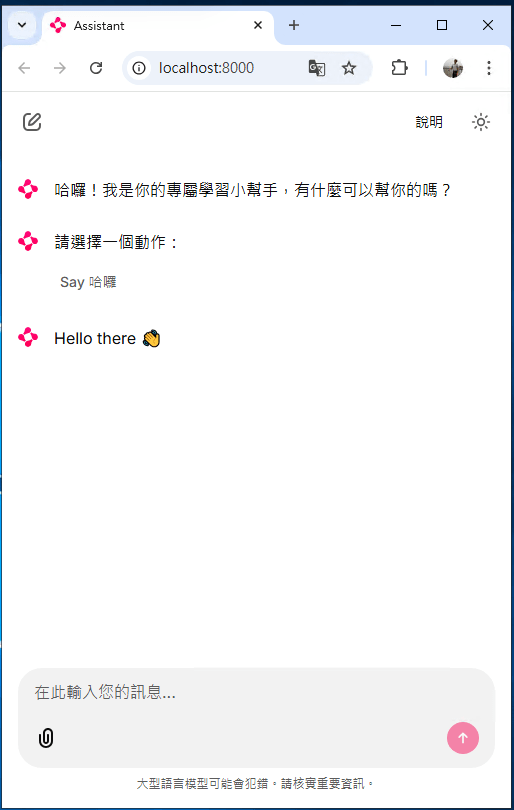
使用 cl.Action 建立按鈕,並透過 @cl.action_callback 處理點擊
這對於建立無需輸入文字的乾淨介面非常有用
Chainlit UI actions
import chainlit as cl
import asyncio

## chat lifecycle hooks #1
@cl.on_chat_start
async def on_chat_start():
    actions = [
        cl.Action(
            name="hello",
            label="Say 哈囉",
            icon="👋",
            payload={"value": "hi"}
        )
    ]
    await cl.Message(content="哈囉!我是你的專屬學習小幫手,有什麼可以幫你的嗎?").send()
    await cl.Message(content="請選擇一個動作:", actions=actions).send()

## chat lifecycle hooks #2
@cl.on_message
async def on_message(msg: cl.Message):
    await cl.Message(content=f"思考中...可以按一下停止鍵來取消對話").send()
    try:
        await asyncio.sleep(10)  # 模擬LLM思考時間較久的情形
        await cl.Message(content="思考完成!").send()
    except asyncio.CancelledError:
        await cl.Message(content="對話已取消").send()
        # optional, logs into server
        raise

## chat lifecycle hooks #3 取消對話
@cl.on_stop
async def on_stop():
    print("對話已取消")

# chat lifecycle hooks #4 對話結束
@cl.on_chat_end
async def on_chat_end():
    print("對話結束")

## UI Actions- Buttons
@cl.action_callback("hello")
async def on_hello(action: cl.Action):
    await cl.Message(content=f"Hello there 👋").send()

def main():
    print("Hello from au-student-agent!")

if __name__ == "__main__":
    asyncio.run(main())
ui-actions.py
chainlit run ui-actions.pyChainlit Message Streaming
訊息串流 (Message Streaming)
設定 stream=True 可實現即時串流回傳,增加動態回饋感
Chainlit Message Streaming
import chainlit as cl
import asyncio
from langchain_ollama import ChatOllama

# 初始化 Ollama 本地模型
llm = ChatOllama(
    model="gemma4:e4b",
    temperature=0,
    # num_predict=1024,    # 限制輸出長度
)

## chat lifecycle hooks #1
@cl.on_chat_start
async def on_chat_start():
    actions = [
        cl.Action(
            name="hello",
            label="Say 哈囉",
            icon="👋",
            payload={"value": "hi"}
        )
    ]
    await cl.Message(content="哈囉!我是你的專屬學習小幫手,有什麼可以幫你的嗎?").send()
    await cl.Message(content="請選擇一個動作:", actions=actions).send()

## chat lifecycle hooks #2
@cl.on_message
async def on_message(msg: cl.Message):
    await cl.Message(content=f"思考中...可以按一下停止鍵來取消對話").send()
    msg_reply = cl.Message(content="", author="LLM")
    await msg_reply.send()
    async for chunk in llm.astream(msg.content):
        await msg_reply.stream_token(chunk.content)
    await msg_reply.update()


## chat lifecycle hooks #3 取消對話
@cl.on_stop
async def on_stop():
    print("對話已取消")

# chat lifecycle hooks #4 對話結束
@cl.on_chat_end
async def on_chat_end():
    print("對話結束")

## UI Actions- Buttons
@cl.action_callback("hello")
async def on_hello(action: cl.Action):
    await cl.Message(content=f"Hello there 👋").send()

def main():
    print("Hello from au-student-agent!")


if __name__ == "__main__":
    asyncio.run(main())
streaming.py
chainlit run streaming.pyChainlit Example: surprise me!
import chainlit as cl
import random

FUN_FACTS = [
    "💡 Did you know? Chainlit supports file uploads and custom themes!",
    "💡 You can add buttons, sliders, and images directly in your chatbot UI!",
    "💡 Chainlit supports real-time tool execution with LangChain and LLMs!",
    "💡 You can customize the look of your chatbot with just a CSS file!",
    "💡 Chainlit lets you connect to tools using Model Context Protocol (MCP)!"
]
SUPRISES = [
    "🎉 Surprise! You're doing great!",
    "🚀 Keep it up, you're making awesome progress!",
    "🌟 Fun fact: Someone out there just smiled because of you. Why not make it two?",
    "👏 Bravo! You just unlocked +10 imaginary developer XP!",
    "💪 Remember: Even bugs fear your debugging skills!"
]
actions =[
        cl.Action(
            name="surprise_button",
            label="🎁 Surprise Me",
            icon="gift",
            payload={"value": "surprise"}
        ),
        cl.Action(
            name="fact_button",
            label="💡 Did you know?",
            icon="lightbulb",
            payload={"value": "fact"}
        )

    ]

@cl.on_chat_start
async def start():
    await cl.Message(content="Choose an action:", actions=actions).send()

@cl.action_callback("surprise_button")
async def on_surprise(action: cl.Action):
    surprise = random.choice(SUPRISES)
    await cl.Message(content=surprise).send()
    # 點完後再次顯示按鈕選單
    await cl.Message(content="Please choose an action again:", actions=actions).send()

@cl.action_callback("fact_button")
async def on_fact(action: cl.Action):
    fact = random.choice(FUN_FACTS)
    await cl.Message(content=fact).send()
    # 點完後再次顯示按鈕選單
    await cl.Message(content="Please choose an action again:", actions=actions).send()
surprise-me.py
chainlit run surprise-me.pyChainlit Example: surprise me! with Local LLM
import chainlit as cl
from langchain_ollama import ChatOllama

MODEL = "orieg/gemma3-tools:4b-ft"

llm = ChatOllama(model=MODEL,base_url="http://localhost:11434",temperature=0.7)

### Action buttons
actions = [
    cl.Action(
        name="surprise_button",
        label="🎁 Surprise Me",
        icon="gift",
        payload={"value": "surprise"}
    ),
    cl.Action(
        name="fact_button",
        label="💡 Did you know?",
        icon="lightbulb",
        payload={"value": "fact"}
    )
]

### on_chat_start: 顯示歡迎訊息及按鈕選單
@cl.on_chat_start
async def start():
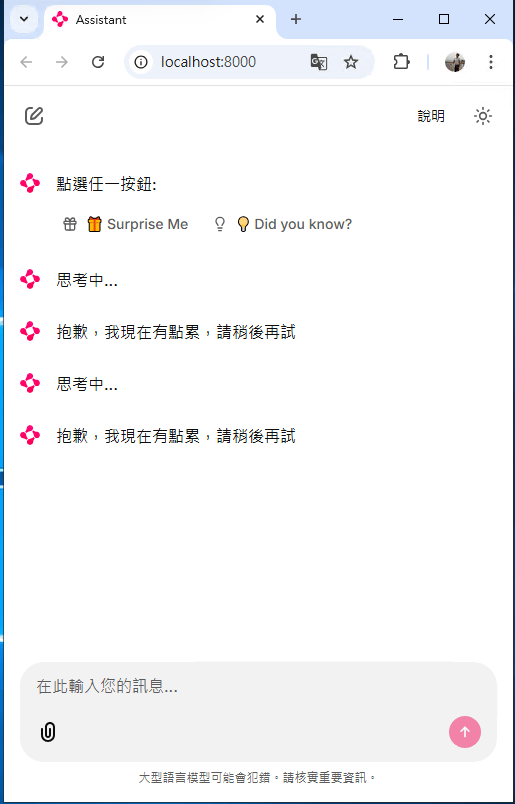
    await cl.Message(content="點選任一按鈕:", actions=actions).send()

### on_action_callback: 處理suprise_button 點擊事件
@cl.action_callback("surprise_button")
async def on_surprise(action: cl.Action):
    await cl.Message(content="思考中...").send()
    prompt = "請給我一個隨機的驚喜,用繁體中文回答,簡短即可"
    try:
        surprise_msg = await llm.ainvoke(prompt)
    except Exception:
        await cl.Message(content="抱歉,我現在有點累,請稍後再試").send()
    await cl.Message(content=surprise_msg.content).send()
    await cl.Message(content="請再選擇一個動作:", actions=actions).send()

### on_action_callback: 處理fact_button 點擊事件
@cl.action_callback("fact_button")
async def on_fact(action: cl.Action):
    await cl.Message(content="思考中...").send()
    prompt = "請給我一個隨機的冷知識,用繁體中文回答,簡短即可"
    try:
        fact_msg = await llm.ainvoke(prompt)
    except Exception:
        await cl.Message(content="抱歉,我現在有點累,請稍後再試").send()
    await cl.Message(content=fact_msg.content).send()
    await cl.Message(content="請再選擇一個動作:", actions=actions).send()
surprise-me-llm.py
chainlit run surprise-me-llm.pyApplications
Student Entrance Agent
Application Student Entrance Agent
from typing import TypedDict, Annotated, Optional, List
from langchain_core.messages import BaseMessage
from langgraph.graph import add_messages
from pydantic import BaseModel, Field
from langchain_ollama import ChatOllama
from langchain_core.prompts import ChatPromptTemplate
from langgraph.graph import StateGraph, START, END
import chainlit as cl

# 學生基本資訊模型
class StudentInfo(BaseModel):
    department: Optional[str] = Field(None, description="學生所屬系別,例如:資工系")
    school_type: Optional[str] = Field(None, description="學制:大學部 或 30+人生大學 或 碩士班")
    grade: Optional[str] = Field(None, description="年級,例如:大一")
    is_male: Optional[bool] = Field(None, description="性別,男為true,女為false,若未提及則設定為null")
    needs_housing: Optional[bool] = Field(None, description="是否需要申請住宿")

# LangGraph 狀態模型
class AgentState(TypedDict):
    messages: Annotated[list[BaseMessage], add_messages]
    student_info: StudentInfo
    current_step: str # 追蹤目前在哪個詢問階段

# 初始化 Ollama 本地模型
llm = ChatOllama(
    model="gemma4:e4b",
    temperature=0,
    # num_predict=1024,    # 限制輸出長度
)

async def info_extractor(state: AgentState):
    """
    負責從對話中提取學生資訊的節點
    """
    prompt = ChatPromptTemplate.from_messages([
        ("system", """你是一位專業的新生入學助理。
        你的任務是從對話中提取:系別、學制(大學部/30+人生大學/碩士班)、年級以及性別(is_male: true/false)。
        若未提及請設定為 null。"""),
        ("placeholder", "{messages}")
    ])

    # 這裡建議使用 LLM 的 Tool Calling 或強制 JSON 輸出
    chain = prompt | llm.with_structured_output(StudentInfo)
# 執行提取
    new_info = await chain.ainvoke(state) # 使用 ainvoke

    # 打印出來檢查 (Chainlit 模式下建議用 print 或是 async send)
    # await cl.Message(content=f"--- LLM 提取結果: {new_info} ---").send()

# 合併資訊邏輯修正
    # 這裡確保只有當 new_info 裡面有值時才更新,避免 null 覆蓋掉舊的有效資訊
    current_info_dict = state["student_info"].dict()
    new_info_dict = new_info.dict(exclude_none=True)

    # 合併字典並產生新的 StudentInfo 物件
    updated_info_dict = {**current_info_dict, **new_info_dict}
    updated_info = StudentInfo(**updated_info_dict)
    return {"student_info": updated_info}

def ask_info_node(state: AgentState):
    info = state["student_info"]

    if not info.school_type:
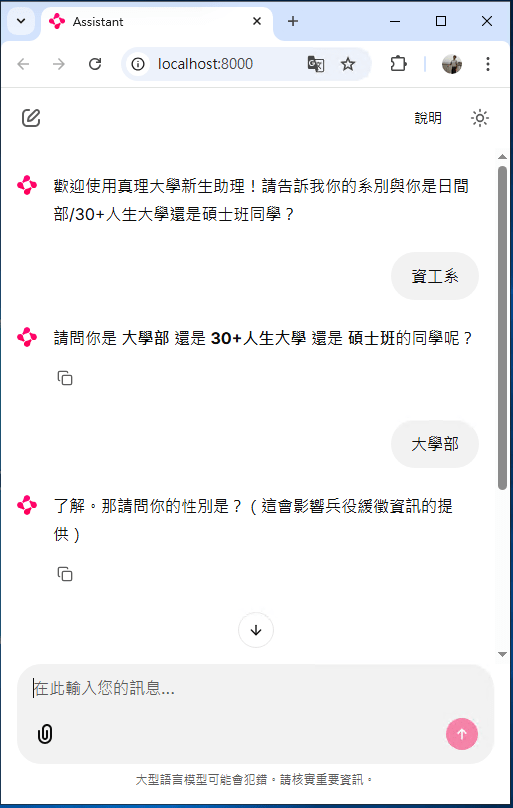
        msg = "請問你是 **大學部** 還是 **30+人生大學** 還是 **碩士班**的同學呢?"
    elif info.is_male is None:
        msg = "了解。那請問你的性別是?(這會影響兵役緩徵資訊的提供)"
    elif not info.department:
        msg = "最後,請告訴我你錄取的 **系別**(例如:資工系)。"
    else:
        msg = "資訊已齊全,準備為您生成清單..."

    return {"messages": [("assistant", msg)]}

def roadmap_generator(state: AgentState):
    """
    最終生成個人化入學指南的節點
    """
    freshmen_system_instructions = """
    核心任務: 你是一位專業、親切且細心的教務處助理。你的目標是根據《115學年度大學部新生入學須知》,引導新生完成註冊流程。
    由於目前尚未整合 SSO 單一登入,你必須透過主動問答來識別學生身分,並提供個人化的進度建議。

    📅 關鍵時程與警示 (內化知識)
    註冊/繳費/貸款截止: 115/09/02 (三) 17:00 (最優先提醒項目)。
    住宿申請: 115/08/01 (九點起) 至 08/27 (17:00止)。
    新生健檢: 115/09/11 (五)。
    開學/驗證學歷日: 115/09/14 (一)。

    🛠 運作邏輯與步驟
    第一階段:身分識別 (Mandatory)
    在提供詳細清單前,你必須先確認學生的身分。若學生未主動說明,請禮貌詢問:
    系別與學制(大學部/30+人生大學/碩士班)。
    關鍵屬性確認:是否為男同學(兵役)、是否有住宿需求、是否為境外生(外籍/僑/陸)、是否需要助學補助。

    第二階段:提供個人化 Check-list
    根據身分,將 115 學年度的任務分類為:
    【必辦項目】線上註冊: 包含更改密碼、填寫資料(特別提醒英文姓名)、上傳 5 大文件(身分證、畢業證、收據、存摺、照片)。
    【時效提醒】住宿/停車: 若學生有需求,務必提醒 08/27 前完成住宿申請。
    【特殊身分】兵役/境外生: * 男同學:提醒進行緩徵、儘召資料檢覈。

    境外生:提醒開學後一週內至國際事務中心辦理。

    第三階段:細節專家 (Deep Dive Advice)
    當學生問到具體細節時,請務必精確引用以下規範:
    存摺: 推薦淡水一信、華南、中信、新光(免手續費)。線上傳過就不用繳紙本。
    退費: 開學前一日申請休退學退費 2/3,開學後依週數遞減。
    學生證: 強調照片務必確認後再傳,且必須完成註冊上傳才能領證。

    ⚠️ 行為準則 (Constraints)
    時效優勢: 若目前日期接近 09/02 或 08/27,請在回覆開頭加上「⚠️ 緊急提醒」。
    專業語氣: 使用台灣繁體中文,語氣需表現出歡迎與支持,降低新生的焦慮感。
    單一資訊: 每次回覆不要一次給予過多雜訊,應採取「階梯式導引」,先給大項,學生詢問後再給細節。
    網址處理: 若需提供網址,請告知學生可至「真理大學註冊組」官網搜尋相關連結。
    """

    # 結合當前收集到的學生狀態
    student_context = f"目前學生身分:{state['student_info']}"

    prompt = f"""
    根據學生資訊:{student_context}
    請為這位學生生成一份 Markdown 格式的「入學報到個人化清單」。
    務必包含:線上註冊截止日(9/03)、應上傳的文件、以及針對其身分(兵役/住宿)的特別提醒。
    """
    response = llm.invoke([
        ("system", freshmen_system_instructions),
        ("human", prompt)
        ])
    return {"messages": [response]}

workflow = StateGraph(AgentState)

# 新增節點
workflow.add_node("extractor", info_extractor)
workflow.add_node("ask_info", ask_info_node)       # 生成提問(按鈕或文字)
workflow.add_node("generator", roadmap_generator)

# 設定入口
workflow.set_entry_point("extractor")

# 邏輯判斷:資訊齊全了嗎?
def should_continue(state: AgentState):
    info = state["student_info"]
    # 如果核心資訊(系別、學制、性別)還不齊全,就繼續問
    if not info.department or not info.school_type or info.is_male is None:
        return "ask_more"
    return "generate"

# 設定邊界
workflow.add_conditional_edges(
    "extractor",
    should_continue,
    {
        "ask_more": "ask_info", # 回到 Chainlit 讓使用者回答
        "generate": "generator"
    }
)

workflow.add_edge("ask_info", END)
workflow.add_edge("generator", END)
app = workflow.compile()

print(app.get_graph().print_ascii())

@cl.on_chat_start
async def start():
    # 初始化狀態
    cl.user_session.set("state", {
        "messages": [],
        "student_info": StudentInfo(),
        "current_step": "init"
    })
    await cl.Message(content="歡迎使用真理大學新生助理!請告訴我你的系別與你是日間部/30+人生大學還是碩士班同學?").send()

@cl.on_message
async def main(message: cl.Message):
    state = cl.user_session.get("state")
    state["messages"].append(message.content)

    # 執行 LangGraph
    # await cl.Message(f"正在分析中...{state['student_info']}").send()
    final_state = await app.ainvoke(state)

    # 更新 Session 狀態
    cl.user_session.set("state", final_state)

    # 取得最後一個訊息回傳給使用者
    last_msg = final_state["messages"][-1].content
    await cl.Message(content=last_msg).send()
student-agent.py
chainlit run student-agent.py